

Bytello Share software for Speechitouch interactive screens
Regular price 90,00 €HT 108,00 €TTC
4K Mirror Wi-Fi Dongle (iOS, Android, Windows, MAC, Chrome)
Regular price 129,00 €HT 154,80 €TTC-
Wireless transmitter, USB-C, Plug & Play for SpeechiTouch interactive displays
Regular price 204,00 €HT 244,80 €TTC 

HDMI Replication Kit - WiFi - Transmitter + Receiver Pack
Regular price 299,00 €HT 358,80 €TTC-
Coin Coin Mini Wireless HDMI Transmitter with Receiver
Regular price 451,00 €HT 541,20 €TTC -
Regular price 779,00 €HT 934,80 €TTC
-
Additional Transmitter - BYOM Pro Speechi Solution
Regular price 171,00 €HT 205,20 €TTC -
Wireless HDMI transmitter with Coin Coin USB receiver
Regular price 451,00 €HT 541,20 €TTC

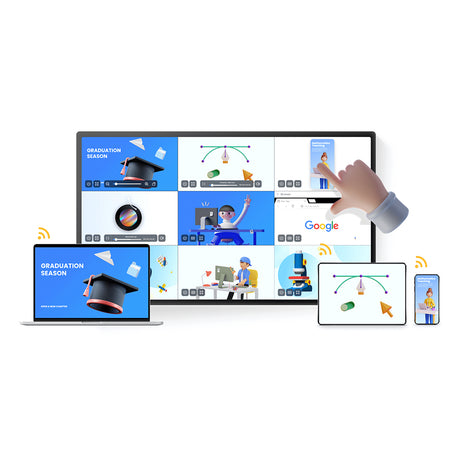


Wireless presentation tools, allies of interactive solutions
What is a BYOD tool?
BYOD (Bring Your Own Device) tools have revolutionized the way we work and interact with modern technology. With these tools, you can connect your personal devices, such as smartphones, tablets, and laptops, to larger screens to easily share content with others.
These wireless presentation tools allow you to stream the image from your computer or tablet to one of our interactive solutions, for example: interactive screens, interactive projectors...
When should you use a mirroring tool?
This allows you to follow and participate in a meeting, or control your screen remotely. These collaborative tools will also enhance your meetings and presentations. Depending on the model, they allow you to host live meetings with up to 12 people, whether they are physically present in the room or participating remotely.
BYOD tools are often used in connected meeting rooms to facilitate wireless screen sharing (mirroring) on Speechi interactive displays. Wireless sharing allows users to easily share presentations, documents, and videos from their personal devices directly to the Speechi interactive display, without having to plug in any cables.
The advantages of a BYOD wireless presentation tool
- Flexible wireless presentations
- Compatible with Speechi interactive displays
One of the advantages of wireless screen sharing is that it allows for greater flexibility during presentations. Users can move freely around the room while presenting their content, enabling better interaction with other meeting participants. Furthermore, wireless sharing eliminates the need for cumbersome cables and complicated setups, making meeting room setup and management easier.
In short, BYOD tools are a smart choice for businesses looking to maximize productivity during meetings and presentations. Speechi interactive displays offer a more immersive collaboration experience, and using BYOD tools facilitates wireless screen sharing for more flexible and efficient presentations.
More and more businesses, government agencies, and local authorities are holding remote meetings. These meetings allow them to reduce travel while bringing together colleagues located near or far from a main meeting room. This room houses several essential devices for creating a videoconferencing system that meets the needs of all types of organizations. Don't overlook the software. We're here to help by providing advice and information on our blog and in all our product descriptions!
How to create your video conferencing system?
Several devices can be used to create a complete setup for remote conferences. You can start with an interactive display, with or without a built-in microphone or webcam. If you don't already have one, you can rely on a high-definition camera. This video device will allow you to film all participants in a physical meeting, whether seated around a table or standing, giving a demonstration using a touchscreen! To order the best HD camera, several criteria must be considered: maximum resolution, focus type, control port, viewing angle, etc.
A wireless microphone and speaker allow you to create a very practical wireless video conferencing system. In this section, you'll also find a selection of lavalier microphones. Thanks to their range, every meeting participant can operate without a cable. The hands-free function will also facilitate movement and communication. The speaker will guarantee exceptional sound quality, ensuring clear communication between participants located dozens or hundreds of kilometers apart.
For a truly professional video conferencing system, you also need specific software. This page offers suitable computer and collaborative programs. To facilitate dynamic presentations or record discussions during a web conference, you will find perfectly adapted software. You will find all their features on the product pages.
Therefore, setting up a free video conferencing system is difficult. To organize a high-quality remote meeting, you'll likely need to make some investments. However, you can use some free applications (under certain conditions). For example, a video conferencing system using Teams or Skype can be used to facilitate oral communication between colleagues on-site and others remotely.
A diverse catalog to help you make your remote meetings a success!
The diversity of our offering allows us to meet the needs of all professionals. Industries, service companies, design offices, training organizations or IT services companies, SMEs and very small businesses as well as large groups, all can easily create a video conferencing system for their meeting room!
Furthermore, you can also consult the numerous articles published on our blog. You can find comparisons of video conferencing systems by reading our many articles on the subject. You'll gain a better understanding of the specific features of certain HD cameras or microphones available in our online store. Also, take the time to read customer reviews for many of our video conferencing devices and software!
You will always know the price of a complete video conferencing system. You can then order with the benefit of a fully secure payment system and multiple services.
Want to learn more about setting up a video conferencing system? How do you ensure a successful video conference in a meeting room? To better understand the features of interactive screens, HD cameras, microphones, and video conferencing software, feel free to contact our customer service team by email. You can also speak with interactive solutions specialists by phone. Finally, you're always welcome to visit our showroom in Lille.