
 Sold out
SpeechiTouch UHD Infrared Android Interactive Touchscreen | 65"
Regular price 990,00 €HT 1.188,00 €TTC-
Sold out
SpeechiTouch UHD Capacitive Interactive Touchscreen | 75"
Regular price 2.090,00 €HT 2.508,00 €TTC 
SuperGlass Essential Interactive Display | 65"
Regular price 1.466,00 €HT 1.759,20 €TTC-
SuperGlass Essential Interactive Display | 75"
Regular price 1.735,00 €HT 2.082,00 €TTC -
Interactive Touchscreen Display Pro | 75"
Regular price 2.178,00 €HT 2.613,60 €TTC -
Interactive Touch Screen Pro | 65"
Regular price 1.850,00 €HT 2.220,00 €TTC -

SpeechiTouch UHD Capacitive Interactive Touchscreen | 86"
Regular price 2.440,00 €HT 2.928,00 €TTC -
Ecran interactif tactile Speechi NOOS | 65 pouces
Regular price 1.024,00 €HT 1.228,80 €TTC -
Ecran interactif tactile Speechi NOOS | 86 pouces
Regular price 1.625,00 €HT 1.950,00 €TTC -
Ecran interactif tactile SuperGlass 3 SpeechiTouch | 86" (Wi-Fi et mirroring inclus)
Regular price 2.920,00 €HT 3.504,00 €TTC -
Ecran interactif tactile SuperGlass 3 SpeechiTouch |75" (Wi-Fi et mirroring inclus)
Regular price 2.337,00 €HT 2.804,40 €TTC -
SuperGlass Essential Interactive Display | 86"
Regular price 2.026,00 €HT 2.431,20 €TTC -
SuperGlass 3 SpeechiTouch PLUS Interactive Touchscreen | 92" (Wi-Fi and mirroring included)
Regular price 5.190,00 €HT 6.228,00 €TTC -
Superglass 3 SpeechiTouch interactive touch screen | 105" (Wi-Fi and mirroring license included)
Regular price 9.350,00 €HT 11.220,00 €TTC -
SuperGlass 3 SpeechiTouch interactive touch screen | 65" (Wi-Fi and mirroring license included)
Regular price 2.056,00 €HT 2.467,20 €TTC -
Interactive Touchscreen Display Pro | 86"
Regular price 2.567,00 €HT 3.080,40 €TTC -
Superglass+ S SpeechiTouch interactive touch screen | 75"
Regular price 1.790,00 €HT 2.148,00 €TTC
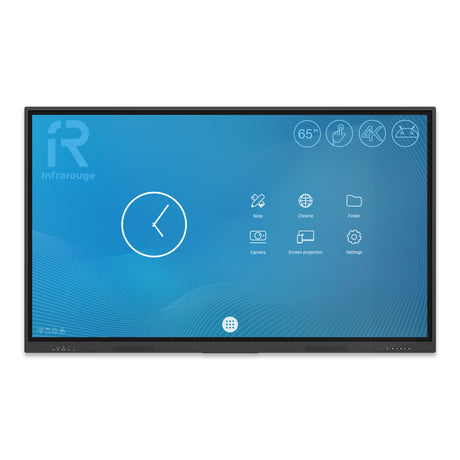
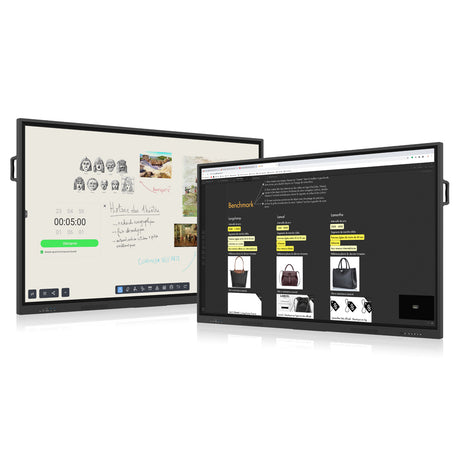


Mastering the use of an interactive digital screen in a professional or educational setting is not something that can be improvised. It is a technological investment that radically transforms the way we collaborate, teach, and interact with projected content. The quality of the screen, the precision of the touch, the responsiveness of the interface: these are all criteria that make a difference for a fluid and efficient user experience.
Touch models dedicated to training are experiencing sustained growth. They meet a specific need: to provide a powerful tool, simple to use, and capable of energizing both a lecture and a company workshop. Let's talk concretely about the major advantages of this equipment available on speechi.com.
Use cases for an interactive digital screen in a training context
Schools, training organizations, internal corporate competence centers... all benefit from an interactive digital screen when used methodically. It becomes a central pivot in content animation: lesson plans, videos, quizzes, shared whiteboards. Every medium comes to life.
In a meeting room, the screen becomes a powerful collaborative tool. A well-calibrated touch model allows you to annotate a document live, share your screen remotely, or launch an enriched videoconference session. Interaction is immediate, and communication gains clarity.
For mobile trainers, some models are mounted on carts or have ergonomic handles. They move easily from one room to another without interrupting the dynamic. Practical for modular environments or networked structures.
Finally, in professional training contexts, these screens facilitate scenario-based learning. Process simulations, role-playing games, collective video feedback: everything is centralized on an intuitive interface. This promotes the rapid acquisition of operational skills.
Interactive Digital Screen, Touch Training Model
The choice of an interactive digital screen for training use is based on a dual requirement: display quality and touch performance. The models offered on speechi.com benefit from UHD or 4K resolution, guaranteeing optimal readability in large rooms as well as in small meeting spaces. Visual comfort remains intact, even after several hours of intensive use.
Each touch training model is equipped with infrared or projected capacitive technology, depending on the range. The latter provides a user experience very close to that of a tablet, with great responsiveness to finger or stylus. Handwriting becomes natural, fluid... almost like on paper. And that changes everything!
The screen can accommodate several users simultaneously. This multi-point function encourages group work, brainstorming, and interactive presentations. No more long static monologues: make way for direct interaction with content and colleagues. This strengthens engagement and stimulates active participation.
Thanks to its integration into a Windows, Android, or hybrid environment, the equipment remains open to all uses. Whether it's to annotate a PowerPoint, browse the Internet, launch a video conference, or write an equation, everything is done intuitively. The pedagogical or professional approach becomes truly immersive.
Why Speechi values touch for training
At Speechi, the development of touch models for training is based on years of field expertise. We design tools that meet the concrete needs of trainers, teachers, and businesses. The goal: to enable fluid, fast, and uncomplicated use. No unnecessary frills. Just the essentials... but with excellence.
Our screens integrate advanced features designed for educators and training managers alike. We're talking about interactive presentation software, instant annotation tools, and integrated video recording. This allows for the creation of dynamic, memorable, and reusable sessions.
As a leading player, Speechi has surrounded itself with talented developers and designers. Their work has led to refined and consistent interfaces, where each icon has its precise function. No need for a 300-page manual to understand the essentials. The user takes ownership of the screen from the very first minutes.
And then, it must be admitted: touch has something instinctive about it. You point, you zoom, you write, you move... the gesture becomes communication. This direct relationship with content facilitates learning, avoids technical digressions, and improves concentration. It's anything but a gadget. It's a real pedagogical lever.
What are the concrete advantages of a touch training model?
A touch training model transforms learning into a living experience. It's not just about displaying a page, but about manipulating knowledge, exploring its ramifications, and interacting with the content. This dynamic approach captures participants' attention while facilitating memorization.
The ergonomics of the screen play a crucial role. Thin bezels, adjustable stands, well-designed connectivity: every detail counts for pleasant daily use. Even in a noisy environment or difficult lighting, the image remains sharp, without distracting reflections. The user remains focused.
Among the benefits often highlighted is also the ability to pool educational resources. A single screen can be used for presentation, collaborative content creation, document projection, and feedback collection. A real multifunctional tool.
Finally, it should be noted that the interactive screen is a relevant alternative to traditional whiteboards. It allows you to save all annotations, send materials by email, or store them in the cloud. A time saver... and a step towards a successful digital transition.